CCTV people counting

CCTV people counting: footfall counting from the cameras you already own.

Your CCTV already watches every entrance. Glimpse turns those cameras into accurate footfall counters, and then into everything else the same cameras can see: passers-by, dwell, flow, queues and heatmaps.

This page explains how CCTV footfall counting works, what makes a camera suitable, how accurate it is, and how it compares with overhead sensors.
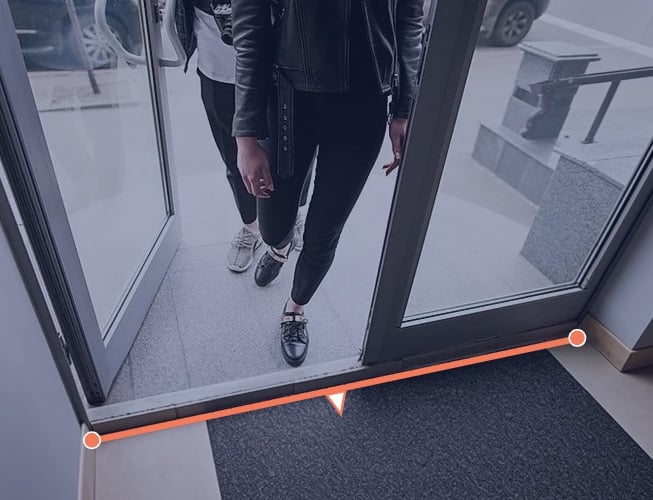
JJStore_Milton_Keynes_JJStore_Footfall_JJStore_Footfall

Trusted by the world's biggest retailers, brands, transport operators and property groups

HarrodsMarks & SpencerCosta CoffeeHotel ChocolatMejuriLGBacardiJack Daniel'sLandsecSavillsSouth Western Railwayc2cExCeL LondonFarmer's Fridge
The definition

What CCTV people counting is


CCTV people counting is footfall counting using the security cameras a building already has, instead of having dedicated counting devices fitted to each doorway.

A processing device on your network takes the live stream from each suitable camera, detects the people in it, follows each one across the view, and logs every crossing of a virtual footfall line drawn across the entrance as an entry or an exit. The video is analysed and discarded in the same moment. No images are stored, only the movement data is retained.

The result is the same count a ceiling-mounted sensor produces - visitors in, visitors out, minute by minute - with three differences. The hardware is already installed, powered, networked and maintained, so most entrances need nothing new. The counting line is drawn in software, so it can go anywhere the camera can see rather than only where a device can be mounted. And because the system sees the whole scene rather than a beam across a doorway, the same cameras can go on to measure where people went, how long they stayed and where they queued.

Glimpse has counted this way across more than 650 stores for a single national retailer, across the UK railway network, and in luxury department stores where fitting new hardware was never an option. The counting accuracy averages 97%, validated against manual counts before every site goes live.

Evidence

Performance you can measure


97%average counting accuracy, validated against manual counts before every go-live
£61kaverage monthly sales increase following deployment

"Glimpse has transformed the way we understand our customers. Their ongoing support as a trusted AI tech partner has been invaluable."

Head of Marketing — leading retail company, 650 stores
How it works

From camera feed to footfall count, in three steps


Capture no background

01 - Connect

A Glimpse processing device on your network receives the live RTSP stream from each suitable camera, via your NVR or directly from the camera. Nothing about the camera changes; nothing is re-cabled.

Detection no background-1

02 - Detect

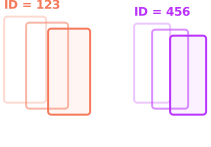
On the device, a computer vision model finds each person in the frame and reduces them to an anonymous position - a box, not a face. The video frame is processed and discarded in the same moment; it is never stored and never transmitted.
Tracking no background

03 - Count

A temporary, anonymous ID follows each position across the view. A virtual footfall line counts each person once in each direction for accurate entry and exit counts.

Accuracy

How accurate is CCTV people counting?


Across Glimpse deployments the average footfall counting accuracy is 97%, measured against manual counts before each site goes live.

Accuracy in CCTV people counting is decided by four things, in roughly this order.

  • The camera view. Whether the camera sees the whole entrance, from what angle, and from how far. This matters more than anything else, and it is the one factor that is fixed before we arrive, which is why every project starts with a site survey.
  • Occlusion. Obstructions that block part of the camera view. Glimpse's proprietary AI and machine learning models can mitigate this in many instances.
  • De-duplication. An overhead doorway counter that simply counts every crossing will count the person who steps in, steps back for a friend and steps in again three times. Tracking each person across the view lets Glimpse de-duplicate repeat crossings, counting them exactly once in each direction.
  • Validation. New footfall lines are compared with manual counts over an agreed sample of hours to tune the detection parameters before anything is reported. If the store layout changes or if a camera is moved, we can re-validate to preserve accuracy.
Camera suitability

Will it work with my cameras?


In most retail estates, yes, and the true answer for any particular entrance is "we'll tell you after we've looked". The question has two halves: the view and the camera.

A good view has three properties. It is clear: the camera sees the whole width of the entrance you want to count, with a little margin either side, and nothing (e.g. a pillar, a display, a door that opens into shot) hides part of it. It shows the complete height of the doorway: the camera should see people from head to foot as they cross the line, because the model uses the whole body to decide that a shape is a person, where their feet are, and which way they are going. A camera that cuts people off at the waist as they enter counts worse than one that sees all of them. And it has low occlusion: people crossing the line should be visible as individuals, which usually means a camera mounted high enough to look down towards the entrance rather than across it. Most door cameras fitted for security already have all three properties.

The camera itself matters less than people expect. Glimpse works with any camera that can provide an RTSP stream to a device on your network - which is virtually every IP CCTV camera made in the last 15 years, from every major manufacturer, either directly or through your NVR. Standard HD resolution is more than enough: the model needs a person to be a reasonable size in the frame, not a sharp picture of them. The things that limit a feed are a very low resolution, poor lighting conditions that limit contrast, or an analogue camera with no network output, and even those usually have a route, either through an encoder or the NVR.
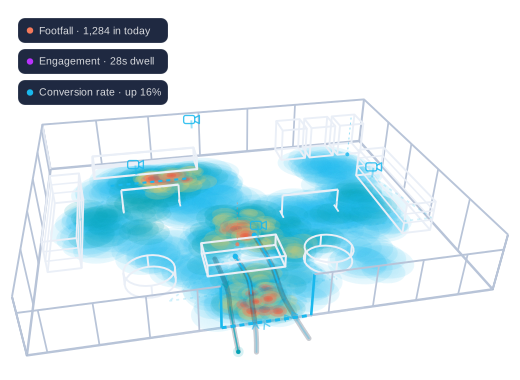
A wireframe view of a store floor, overlaid with a heatmap showing where customers congregate and tracked movement paths crossing the entrance
Flexibility

Count anywhere a camera can see - not just where a sensor can be mounted


An overhead sensor counts the strip of floor beneath it. To move the counting point you have to move the device - an engineer visit and disruption to your store. A footfall line in Glimpse is drawn in software over the camera view, so it can go anywhere in that view, and it can be moved, added to or duplicated as a configuration change with no one on site.

That changes where you can count. Put the line where the visit actually begins: past a lobby where people shelter from the rain, beyond an ATM vestibule, after a reception desk in an office or a showroom, so that the count is people who came in rather than people who stood in the doorway. Draw a second line across the entrance to a department, a fitting room or a concession and the same camera gives you flow - how many of the people who came in got that far. Draw a line along the pavement in a frontage camera and you have passers-by, the denominator for capture rate. Draw a polygon instead of a line and you have a zone, for dwell, occupancy and queues.

Any number of lines and zones can be defined, each tagged by category - footfall, passer-by, flow - and aggregated up the hierarchy from an entrance to a store to a region to the estate. 
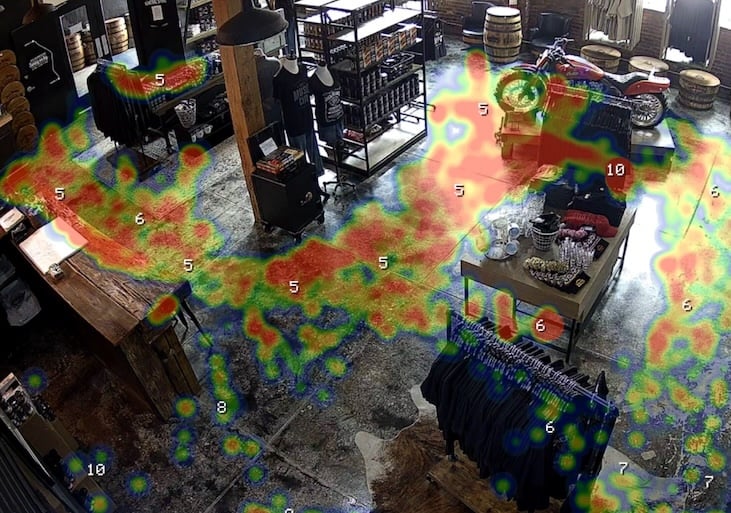
A shop floor seen from a CCTV camera, overlaid with a Glimpse dwell heatmap: red where shoppers stop longest, blue where they pass straight through
Edge processing

Video processed on site. Only the numbers leave.


Every frame is processed on a Glimpse edge device on your premises. The device connects to two things only: the RTSP streams from your cameras, on your network, and the Glimpse platform, over an encrypted connection. 

What it sends is metadata, not video: counts and zone measurements, minute by minute, as numbers. No frame, image or video is stored on the device or transmitted from it.

This approach also makes the network demands small. The data derived from a live camera stream is only a few kilobytes per minute, so CCTV people counting adds no meaningful load to a store's connection and needs no upgrade to it. If the internet connection drops, the device buffers its results locally for up to a week, then syncs automatically when it returns, so there are no gaps in the data.

You don't manage the device. Glimpse monitors every edge device and every camera connection 24×7 from our service management platform, is alerted the moment a camera goes offline, and maintains the devices remotely over encrypted tunnels. Your IT team's involvement is the initial network access - the camera streams and an outbound connection - and nothing day to day.

Privacy-safe by design

The system fully anonymises all captured data and complies with UK GDPR. No video is stored and no personal data is retained.

UK GDPR compliantISO 27001Cyber Essentials certifiedNo facial recognition
Beyond footfall counting

One camera estate, every metric

CCTV people counting is the start. The same cameras, the same edge device and the same platform deliver the whole picture of the visit - and every one of these metrics is built on the same validated footfall count.


Footfall counting

Accurate, de-duplicated counts for every entrance, validated to 97% average accuracy.

Which locations earn their keep?

Passer-by & capture rate

A sensor or line along the frontage counts the street; footfall ÷ passers-by is the share you bring in.

How much demand walks past?

Conversion rate

Footfall plus your POS transactions = the full conversion funnel, store by store, hour by hour.

Flow

Internal lines count movement into departments, fitting rooms and concessions.

Does the layout help or hinder?

Heatmaps

Where visitors congregate and dwell over time, and the dead zones that underperform.

Is every square metre working?

Dwell & engagement

Zones drawn in the camera view measure how long people stay at a fixture, a display, a concession.

Which displays actually work?

Occupancy

Live counts of how many people are in any area, with alerts at a threshold.

Are we using our capacity?

Queue monitoring

Queue length and wait time at checkouts and counters, with alerts before people give up.

Where does friction cost us sales?
Evidence

Counted through the cameras they already had


97%average counting accuracy through standard CCTV, validated against manual counts
650stores deployed for a single national retailer
22%increase in product and concession engagement at a luxury department store, from existing CCTV
£61kaverage monthly sales uplift following deployment

"Glimpse transformed our understanding of concession placement and shopper behaviour, providing insights that optimised store layout and improved customer engagement."

Untitled - 21 September 2026 at 14.02.23 2Head of Customer Experience — luxury department store
Read the case study →

"Glimpse has transformed the way we understand our customers. Their ongoing support as a trusted AI tech partner has been invaluable."

Untitled - 21 September 2026 at 14.26.58Head of Insights — leading retail company, 650 stores
Read the case study →
Common questions

Footfall analytics, answered


How accurate is CCTV people counting?
Glimpse averages 97% footfall counting accuracy through standard CCTV, validated against manual counts before every site goes live and re-validated whenever the camera view changes. Accuracy depends mostly on the camera view. A high-mounted camera that sees the whole doorway from head to foot counts best.
Which CCTV cameras work with Glimpse?
Any camera that can provide an RTSP stream to a device on your network. In practice this is virtually every IP CCTV camera from every major manufacturer, either directly or via your NVR. Analogue cameras can usually be included through the NVR or an encoder.
What do we need to install on site?
One Glimpse edge processing device per site, connected to your network. No cameras are changed, nothing is mounted at the entrances and nothing is re-cabled. Where a doorway has no suitable camera, either a Glimpse Sensor or an additional camera can be added for that doorway only.
What network connection does the site need?
Two things: the edge device must be able to reach the camera streams on your local network (usually the NVR), and it must have an outbound internet connection to the Glimpse platform. It is designed to sit in a DMZ and initiates all connections outbound; no inbound ports are opened. If a site does not have a usable internet connection, Glimpse in a Box provides its own camera and 4G/5G link.
How much bandwidth does it use?
Very little. Video never leaves the device; what it sends is metadata - anonymous coordinates - as numbers, which is only a few kilobytes per minute.
Does our IT team have to manage the processing device?
No. Glimpse manages every edge device remotely over encrypted tunnels, applies updates and security patches, and monitors every device and every camera connection 24×7 from our service management platform.
How is the data kept secure?
The edge device runs a hardened Linux OS, and connects only to your cameras and the Glimpse platform. All data is encrypted in transit and at rest. The platform is hosted in AWS London on a zero-trust architecture, with multi-factor authentication and role-based access on every production system. We operate continuous log analysis and regular vulnerability scanning and automated patching. Glimpse is ISO 27001 certified and holds Cyber Essentials.
Can we count internal areas, not only the entrance?
Yes. A footfall line can be drawn anywhere a camera can see: across the entrance to a department, a fitting room or a concession for flow; along the pavement for passers-by; or after a lobby or reception so the count starts where the visit does. Zones drawn as polygons give dwell, occupancy and queue measurement in the same view.
Can Glimpse replace our discontinued people counters?
Yes. Replacing end-of-life devices is a common starting point. We map your existing counting locations for continuity, import your historical data (tagged as imported), run the new counts in parallel and validate them against manual counts before your old devices are retired.
The platform behind it

The cameras are the efficient part


Reusing your cameras is what makes Glimpse quick to deploy. What makes it worth deploying is the platform they feed. Glimpse gives you a data hierarchy from entrance to estate, minute-level data in the Portal, scheduled reports and a REST API - and the way we work with you after go-live: success criteria agreed first, a Proof of Concept that ends in a business case, and a client success team that stays.

How it works →

Our approach →

See what your cameras could be counting?

A discovery session is a structured conversation about your estate, your challenges and your objectives, and an honest view of the performance opportunity.

The form didn't load. Book a discovery session on our contact page.

No obligation. No hard sell. We'll come back to you within one working day.

Prefer email? sales-emea@glimpseanalytics.com